

1. What Does EXIF Data Actually Record? (Made Simple)
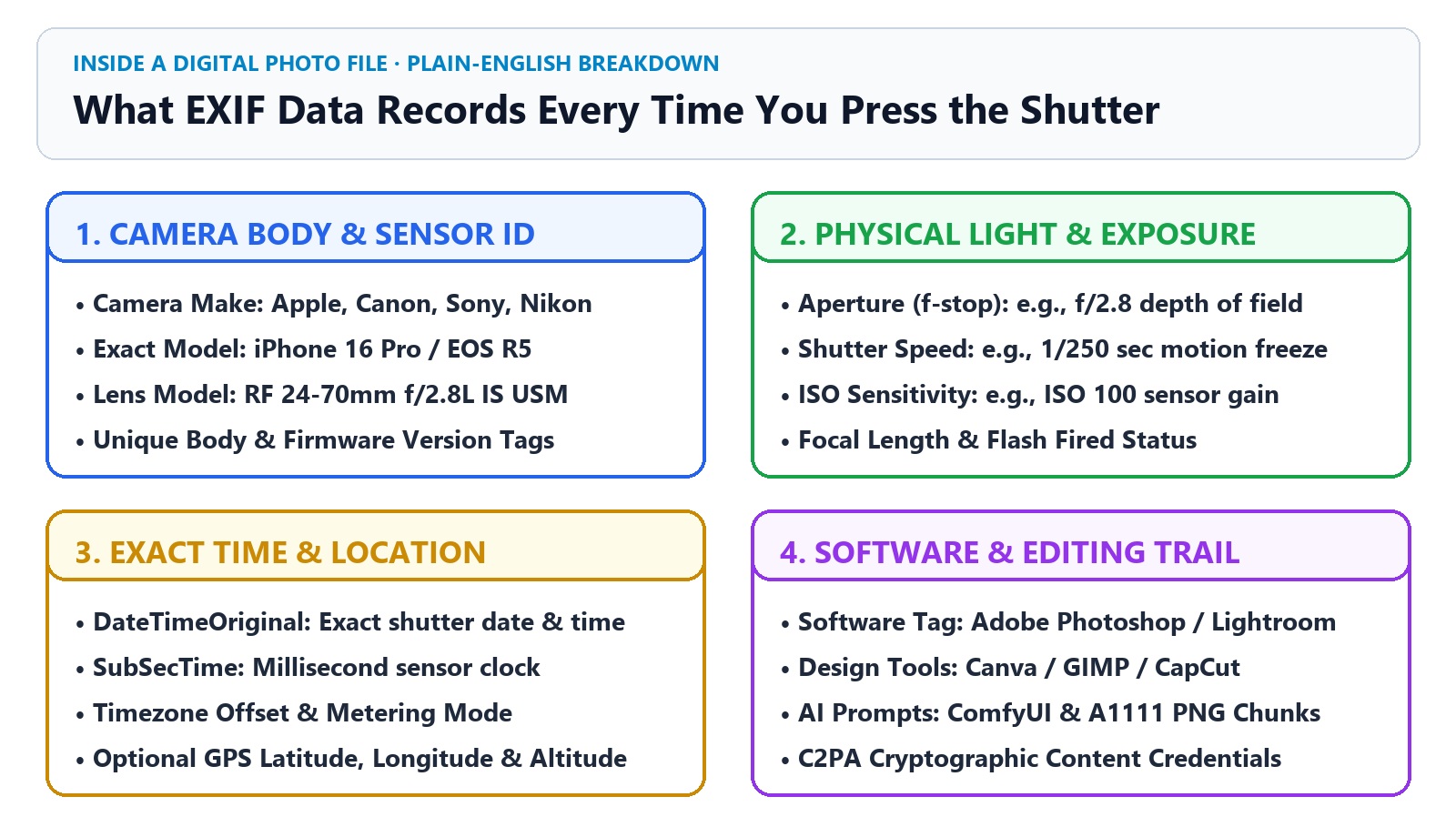
Every time you press the shutter button on an iPhone, Pixel, Canon, Sony, or Nikon camera, the camera's onboard chip does two things in a split second: first, it saves the visible picture; second, it writes a hidden logbook at the very top of the file explaining how the physical light was captured.
You do not need to be a professional photographer to read this logbook. Here are the five plain-English clues stored inside real camera EXIF data:
📱 Camera Make & Model
Names the exact manufacturer and device that took the shot—for example, Apple iPhone 16 Pro, Samsung SM-S928U, or Sony ILCE-7M4.
🔭 Lens Focal Length
Records the physical glass lens measurement in millimeters (such as 24mm wide-angle or 85mm portrait lens) and the lens serial model.
☀️ Aperture & Shutter Speed
Logs how wide the lens iris opened (e.g., f/2.8) and how fast the mechanical or electronic shutter clicked (e.g., 1/250 sec) to freeze motion.
⚡ ISO & Capture Clock
Records the sensor's light sensitivity (e.g., ISO 100 outdoors vs. ISO 3200 at night) and the exact millisecond timestamp the photo was taken.
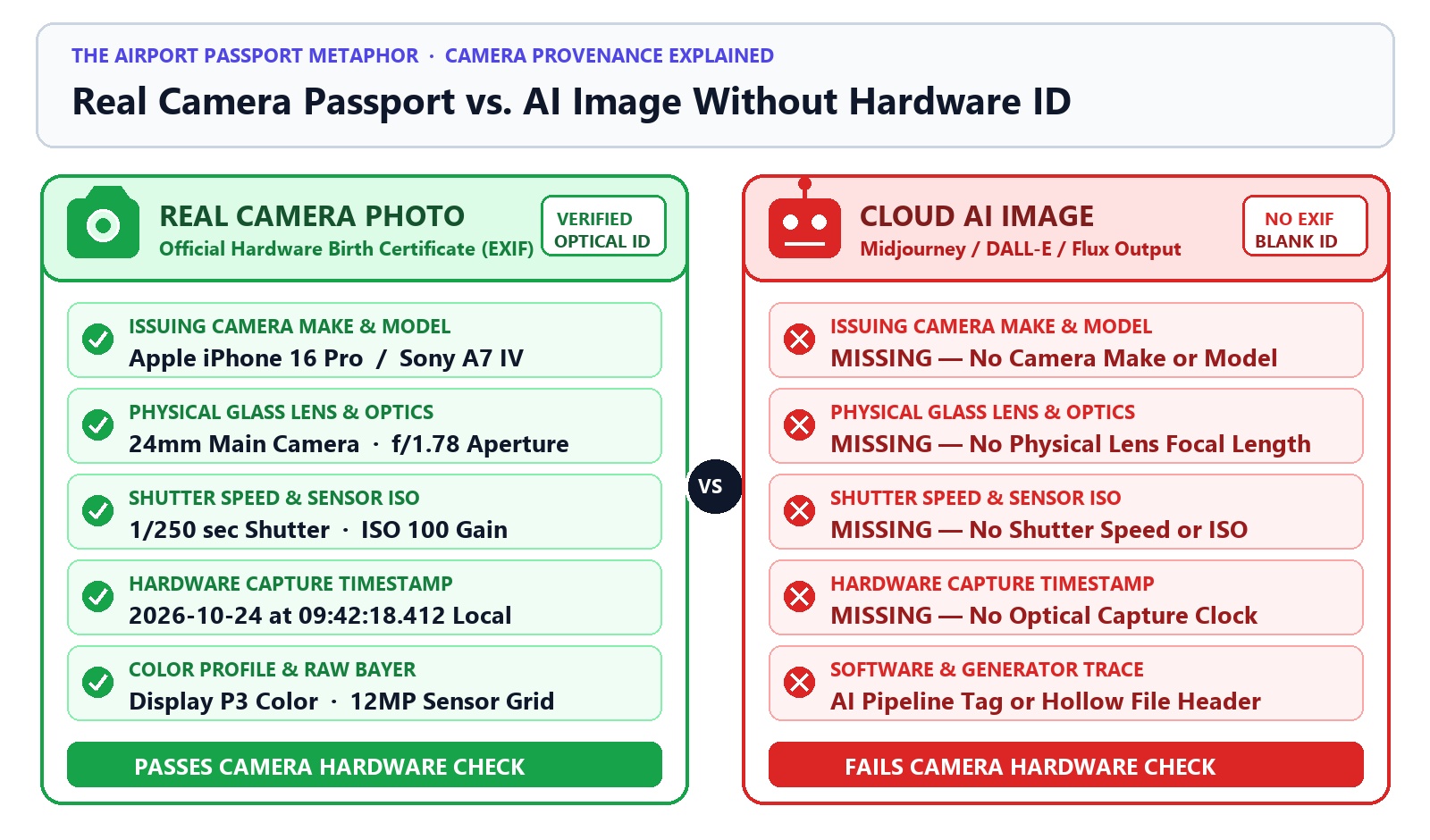
2. Why Midjourney, DALL-E, and Flux Images Have "Hollow" EXIF Headers
When you type a text prompt into Midjourney, ChatGPT (DALL-E 3), or Flux, no light passes through a glass lens. Instead, a graphics card (GPU) in a cloud server starts with a square of random static noise and mathematically denoises it into a picture.
Because there was no physical camera:
-
There is no aperture or shutter speed: An AI generator cannot truthfully write
f/2.8or1/250sbecause no shutter ever opened. - The EXIF camera block is completely hollow: If you download a raw image directly from Midjourney or a cloud generator and inspect its EXIF table, the camera make, lens model, focal length, and ISO fields are empty.
- Some AI tools sign a "Digital Nutrition Label" instead: Tools like OpenAI DALL-E 3 and Adobe Firefly attach a cryptographic C2PA Content Credential stating explicitly that the file was created by Trained Algorithmic Media (AI).
3. What Editing Apps & Local AI Generators Leave Behind
Even when an image wasn't taken by a camera, the program that exported the file often leaves its fingerprints inside the file header. When you drop an image into TruthLens, here is what different tools leave behind:
| Source of the Image | What Is Inside the File Header? | What It Means for You |
|---|---|---|
| 📷 Original Smartphone / DSLR Photo | Camera Make (Apple/Canon/Sony), Lens, f/2.8, 1/250s, ISO, Timestamp |
Strong Camera Evidence — Supports a real physical capture. |
| 🎨 Adobe Photoshop / Lightroom / Canva | Software: Adobe Photoshop or XMP creator history tags |
Edited / Designed — Shows the file was retouched or exported from a design app. |
| 🧬 Stable Diffusion (A1111 / Forge / ComfyUI) | Hidden PNG parameters or prompt & workflow chunks |
100% Confirmed AI — Contains the exact text prompt, seed, and AI model name! |
| 🤖 OpenAI DALL-E 3 / Adobe Firefly | Signed C2PA Content Credential (c2pa.created / AI source tag) |
100% Confirmed AI — Cryptographically signed by the AI generator. |
5. How the TruthLens EXIF & Provenance Engine Checks Any Photo
Instead of acting like a "black-box guessing machine," TruthLens inspects your image in four transparent steps:
- Step 1 — Binary EXIF & Camera Consistency Check: Extracts all hardware camera tags (Make, Model, Lens, Aperture, Shutter Speed, ISO) to verify if the photo has a consistent physical camera origin.
- Step 2 — C2PA & Hidden AI Prompt Recovery: Checks for cryptographic C2PA Content Credentials and extracts hidden ComfyUI / Stable Diffusion prompts, seeds, and LoRA weights if present.
- Step 3 — 3-Model Neural & 2D FFT Pixel Forensics: When EXIF has been stripped by WhatsApp or X, our 3-model AI vision ensemble, 2D Fast Fourier Transform (FFT) grid analyzer, and 3×3 regional splicing heatmap inspect the actual pixels.
-
Step 4 — File Hash & 1-Click OSINT Reverse Search: Computes a cryptographic
SHA-256file hash and 64-bit perceptualdHash, giving you 1-click buttons to trace the earliest unstripped version of the photo on Google Lens, TinEye, Bing, and Yandex.
Common Questions About EXIF Data & AI Photo Verification
What is EXIF data in a photo?
EXIF (Exchangeable Image File Format) is invisible technical metadata automatically saved inside a photo file by a smartphone or digital camera. It records the camera brand and model, lens focal length, aperture (f-stop), shutter speed, ISO sensitivity, date and time taken, and optional GPS coordinates.
Does missing EXIF data prove a photo is AI-generated?
No. While cloud AI generators produce images without camera EXIF data, social media apps like WhatsApp, X (Twitter), Instagram, and Facebook also strip EXIF headers from real camera photos to protect user privacy and reduce file size. When EXIF is missing, you should check pixel-level AI signals and run a reverse image search.
Can someone fake or edit EXIF camera metadata?
Yes. Standard EXIF tags are unsigned text and numbers, so advanced users can copy or edit them using command-line tools like ExifTool. That is why TruthLens never relies on EXIF alone—it always checks cryptographic C2PA signatures, 2D FFT frequency spectra, Error Level Analysis (ELA), and neural pixel classifiers at the same time.
Do AI images ever contain hidden prompt metadata instead of camera EXIF?
Yes! Unstripped PNG and JPEG images created with Stable Diffusion (AUTOMATIC1111, Forge), ComfyUI, SwarmUI, Fooocus, and InvokeAI often store the entire text prompt, negative prompt, seed number, and checkpoint model inside PNG text chunks or the EXIF UserComment field. You can view these instantly with our AI Prompt Extractor.
How can I check camera metadata on my phone or computer for free?
Simply upload the original image file (before sending it through WhatsApp or social media) to the TruthLens AI Image Detector. It reads and displays the EXIF camera tags, C2PA credentials, and pixel authenticity analysis right in your browser without storing your photo.
Test Your Photos & Metadata on Our Standalone Workbenches
Inspect EXIF camera tags, recover hidden AI generation prompts, or verify pixel authenticity—100% in-memory with zero file storage.



Continue Reading: Related TruthLens Articles
Plain-English visual guides on spotting AI photos and understanding AI writing patterns.
 📸 Visual Fact-Checking
 ✍️ Writing Style Guide
4. Why WhatsApp, X, and Instagram Strip EXIF Data (And Why Missing EXIF Doesn't Automatically Mean "Fake")
Here is the most important rule every citizen journalist and everyday user needs to know: An image downloaded from WhatsApp, X (Twitter), Instagram, Facebook, or Reddit will almost always have zero EXIF data—even if it is a 100% real photograph!
Why? Social media networks automatically delete EXIF headers during upload for two good reasons: